
The Tangle Tax
I once visited a customer's home office for a product-research interview. Under his desk was a knot of cables so thick it had lifted the surge protector off the floor — it was dangling by its own cords, two inches above the carpet. He told me he'd "get to it eventually." That was year three of the same setup.
Cable management is the home-office task everyone defers because it feels either cosmetic or overwhelming. In reality, it's neither. It's a structural problem with a finite set of solutions, and you can solve 80% of it with one product and two rules.
1. The One Solution That Handles 80% of Desks
The Under-Desk Cable Tray
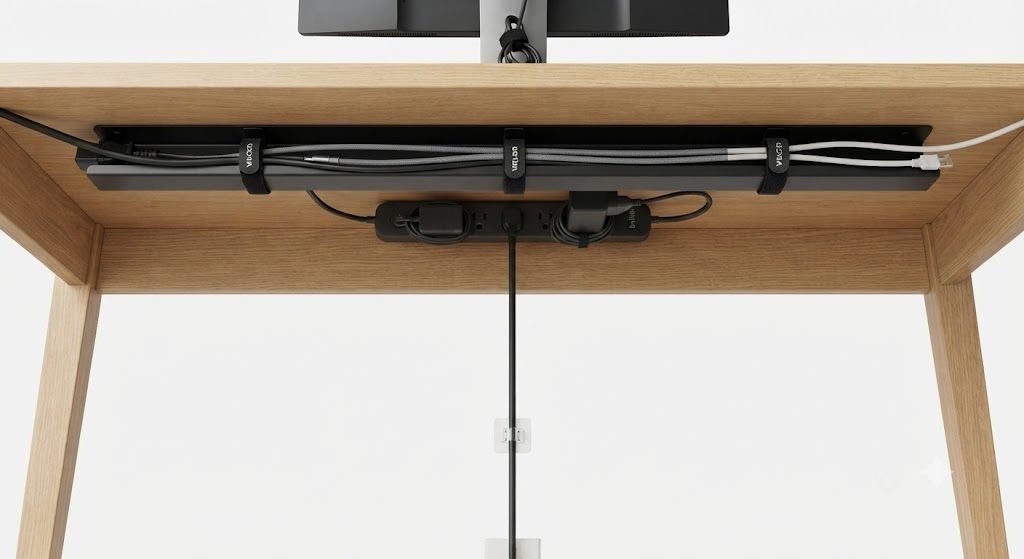
A simple metal tray that mounts to the underside of your desk — usually with screws or clamps — and holds your power strip and excess cable slack. That's it. No raceways snaking up the wall, no spine wraps, no custom-cut foam channels. For most single-user desks, a tray between 12 and 16 inches wide, mounted toward the rear edge, catches everything.
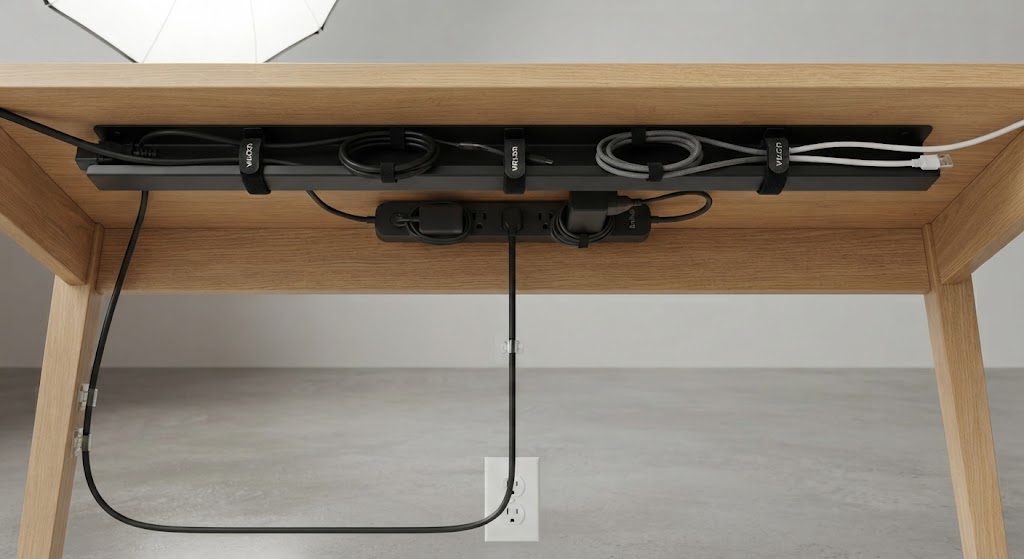
Why it works: the power strip is the hub. If the strip sits on the floor, every device cable must travel down to meet it, creating a vertical curtain of cords. Move the strip up into the tray, and the only cord that touches the floor is the strip's own power cable. One cord. That's the goal.
Mount the tray far enough back that it clears your knees — 18 inches from the front edge is a safe starting point. If your desk has a crossbar, mount the tray behind it. And if you're on carpet, leave that 2-inch gap underneath so your chair doesn't catch the tray.
2. Two Rules That Prevent the Tangle from Coming Back
Rule One: Every Cable Must Leave the Tray Within 6 Inches of Its Device
The tray contains the slack. What leaves the tray should be only the exact length needed to reach a monitor, a laptop dock, or a desk lamp. Bundle any excess in the tray, not on the floor. Use velcro straps — never zip ties, unless you enjoy cutting plastic at arm's length under a desk when you need to swap a cable.
Rule Two: Nothing Sits Directly on the Floor
The power strip cable drops from the tray to the wall outlet. That's it. If your PC tower sits on the floor, route its cables up into the tray along a single leg of the desk, strapped every 8 inches. A simple adhesive-backed cable clip on the inner face of the leg is all it takes.
3. When You Actually Need More
Some setups break the one-tray model. If you have a standing desk that raises and lowers, your cables must accommodate 20 inches of vertical travel. In that case, add a flexible cable spine — a segmented plastic chain that attaches between the tray and the floor or wall — so the cables bend in a controlled arc. That's the only additional complexity most people ever need.
Grommets are helpful but not mandatory. If your desk has a cutout, use it to pass keyboard and mouse cables through, but only if they reach the tray directly underneath. If the grommet is far from the tray, skip it and route cables off the back edge instead — a clean rear drop is better than a diagonal stretch across open air.
4. The Ten-Minute Audit
Grab a roll of velcro straps. Unplug nothing. Get under the desk and bundle cables into groups by destination: monitor cables together, peripheral cables together, power together. Strap each group loosely. Then route each group into the tray along the shortest path that doesn't cross another group. Tighten the straps once everything is in place. That's the whole process. No tools beyond a screwdriver if you're mounting a tray for the first time.