
A desk organizer is not a decorative tray you buy after the real office is finished. It is a small piece of infrastructure that determines where your notebook, charging cable, headphones, and daily paperwork land when the workday gets busy. The right one reduces reach, visual noise, and the time lost hunting for a pen. The wrong one simply gives clutter a set of smaller compartments.
I have managed home-office storage categories long enough to know that the purchase should start with your workflow, not a product photo. Spend two days noticing what crosses your desk. If the same six items stay within arm's reach, design storage around those items and leave everything else farther away.
Start With the Desk, Not the Accessory
Measure the usable surface before choosing a desk organizer. A 48-inch-wide desk with a monitor stand, keyboard, and lamp may leave only 16 inches for active storage. On a 60-inch desk, you can usually reserve 20 to 24 inches without making the work area feel crowded. Depth matters just as much: anything deeper than 8 inches can push your keyboard forward or interfere with a monitor arm clamp.
The desk material also changes the decision. A solid wood top can accept a clamp-on shelf if the clamp has a padded jaw and a broad load plate. A hollow-core laminate top may crush under concentrated pressure, especially near an unsupported edge. For that desk, a freestanding organizer with rubber feet is the safer buy. Check the product's footprint, not just its advertised width. A unit listed as 12 inches wide may need 14 inches of clearance once drawers or side trays open.
Think about reach zones. Items used every few minutes belong between your shoulder and elbow line. Items used once a day can sit behind the monitor or in a nearby drawer. A good desk organizer supports that hierarchy instead of putting every object in front of you.

Materials and Hardware That Earn Their Space
For most home offices, powder-coated steel, solid bamboo, and decent molded plastic are the practical materials. Powder coating is a baked-on finish that resists scratches better than thin painted metal, and steel mesh allows you to see cables or supplies without opening a drawer. Bamboo looks warmer, but inspect the joints. Finger-jointed corners and glued panels are more durable than thin pieces held together with a few staples.
Plastic is not automatically cheap or weak. A thick ABS organizer with a slightly textured surface can outlast a veneer box that swells when a coffee spill reaches an edge. Look for rounded corners, a stable base, and drawer stops that prevent the drawer from coming completely out. If a drawer flexes when you press the center of its bottom panel, it will probably sag under chargers, batteries, and adapters.
Hardware deserves a close look. Felt-lined drawers reduce the rattle of metal clips, while silicone feet keep a unit from skating across a laminate top. For a monitor riser with storage underneath, confirm the stated weight capacity and compare it with your monitor, speaker, and laptop dock combined. A 20-pound capacity is not generous when a 15-pound display is already sitting on it.
Choose the Configuration Around Your Workflow
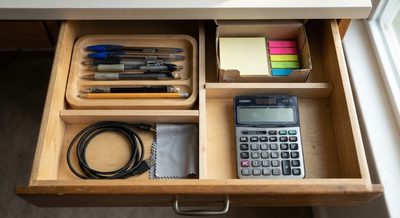
A writer who keeps two notebooks, index cards, and three pens needs a different desk organizer than a video editor with a camera battery charger and external drives. Compartments should fit the objects you actually use. A narrow vertical file section is valuable for bills and client notes, but it wastes space if your work is entirely digital.
For mixed work, I prefer a low rectangular organizer about 12 to 16 inches wide, 6 to 8 inches deep, and no more than 5 inches high. It holds a notebook, phone, pens, and small accessories without blocking the monitor. A raised model works better when the desk is shallow because it uses vertical space, but do not place it directly under a monitor if it forces you to lift your chin.
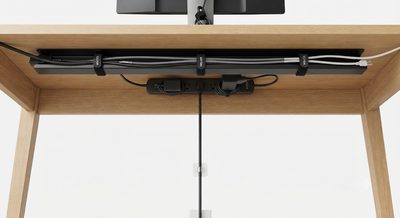
Cable management is where many products fail. A rear channel, pass-through hole, or open side is more useful than five tiny compartments. Route the laptop charger and monitor cable behind the desk, then keep only the connector you reach daily in the organizer. Velcro cable ties are easier to adjust than adhesive clips, which often detach from textured laminate after several months.

Real Layouts for Small and Shared Rooms
In a 10-by-11-foot office, a 55-inch desk against the long wall can leave roughly 30 inches of walking clearance if the chair is compact. Put the organizer on the non-dominant side so your writing hand has an unobstructed landing area. In a bedroom corner, a 42-inch desk may be the honest limit. Use a vertical organizer under 10 inches wide and move reference books to a wall shelf rather than sacrificing half the desktop.
A closet office needs a different approach. With a 24-inch-deep work surface, choose a desk organizer under 6 inches deep and avoid tall backs that reduce the opening's usable height. A clamp-on light and wall-mounted pegboard can handle items that would otherwise crowd the top. In a shared dining area, choose a unit with a lid or concealed drawers so the office can disappear after work. A clean shutdown is easier when every item has a defined return point.
For a standing desk, stability matters more than capacity. A tall stack of supplies becomes a tipping hazard when the surface rises. Keep the organizer low, distribute heavier items toward the center, and leave enough slack in charging cables for the desk's full travel range. Test the highest and lowest positions before committing to a permanent cable route.
When a Cheaper Option Is the Better Buy
You do not need a premium desk organizer to solve a basic pen-and-paper problem. A $15 to $30 steel mesh model from a general office retailer can be completely adequate if its base is flat, its finish is intact, and the compartments match your supplies. Paying $60 or more makes sense when you are buying solid wood, a well-built monitor shelf, smooth drawers, or a modular system that can expand later.
Be cautious with inexpensive faux leather boxes. They often look polished in a listing photo but rely on thin fiberboard under the covering. The edges can peel where your wrist touches them, and the flexible bottom bows under notebooks. If the price is low, inspect construction rather than assuming value. A plain plastic tray with molded dividers is easier to clean and often lasts longer.
Brand names are less important than specifications. Look at dimensions, return terms, material thickness, and warranty language. A one-year warranty will not fix a poor layout, but it does signal that the maker expects the product to remain functional beyond the first few weeks.
A Five-Minute Setup Test
Before ordering, clear a rectangle on your desk using painter's tape. Mark the organizer's proposed width and depth, then place your monitor, keyboard, lamp, and notebook around it. Sit down and simulate opening a drawer, plugging in a phone, and writing a full page. If your elbow hits the organizer or the keyboard moves forward into the edge, the product is too large regardless of how attractive it looks.
Next, gather the objects you expect it to hold and weigh the heavier group. Chargers, batteries, and staplers add up quickly. Confirm that the base will not lift when one drawer opens. Finally, leave the taped footprint in place for one workday. If you repeatedly move objects outside it, revise the configuration before buying.
The best desk organizer is the one that makes the next action obvious. Measure first, match storage to your real workflow, and spend money on stable materials and useful access rather than extra compartments. A modest tray that stays in the right place will outperform an expensive system that turns the desktop into another cabinet.